
You do not need to buy a console to play good games anymore.
That is the useful bit. The less useful bit is that gaming can still look like a private club: subscriptions, controllers, apps, Wi-Fi settings and people online talking as if everyone was born knowing what cloud streaming means.
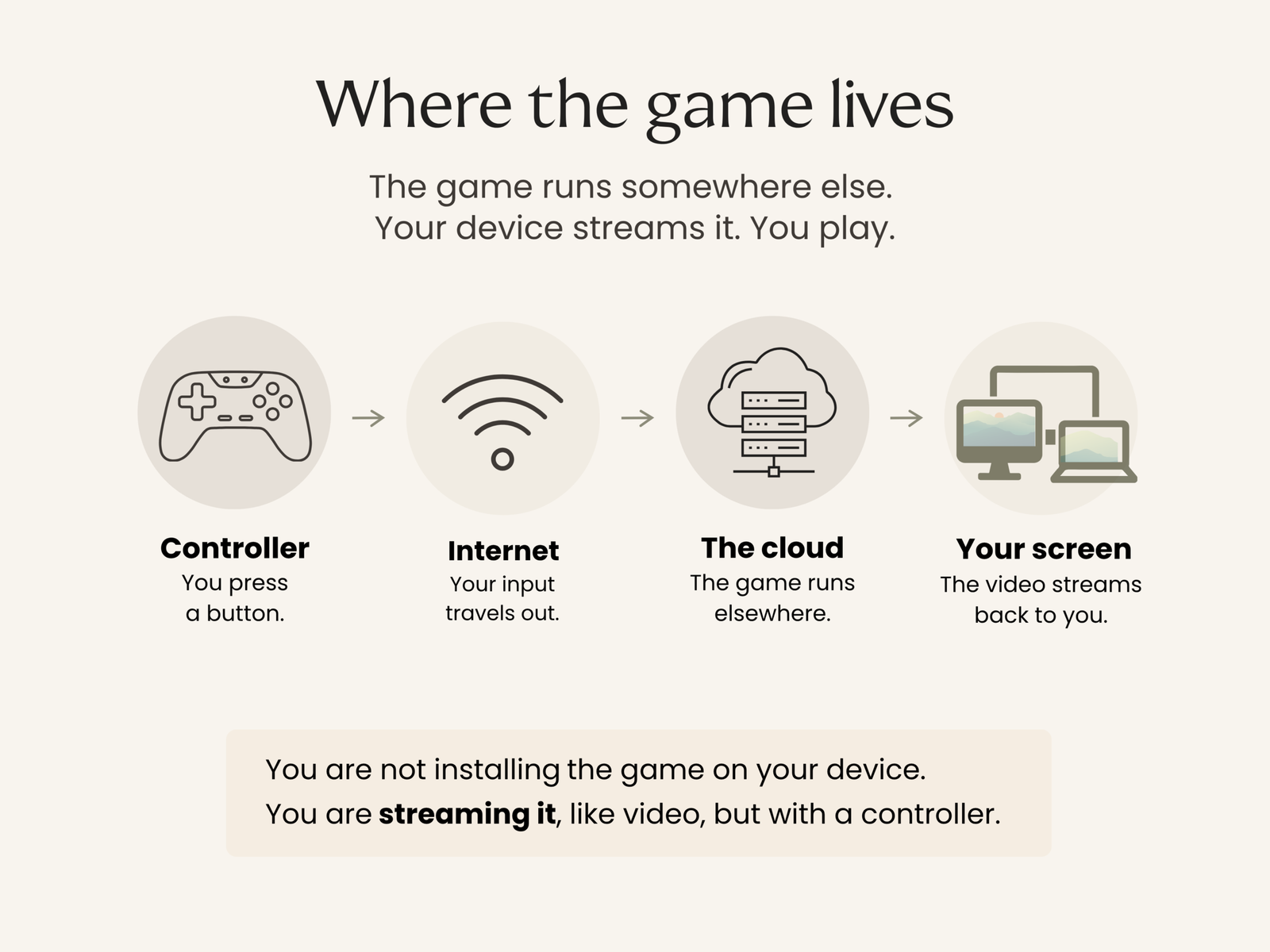
Cloud gaming is a simpler route in. The game runs elsewhere. Your laptop, phone, tablet or TV streams it. You play.
Start here in 60 seconds
Pick your route
Want the simplest “one subscription, lots of games” route? Start with Xbox Cloud Gaming via Game Pass Ultimate.
Already own PC games on Steam or Epic? Start with GeForce NOW.
Already pay Prime and want a low-effort trial? Try Amazon Luna first, but read the June 2026 note.
The bare minimum
Internet: Xbox says best performance is 10 Mbps on mobile devices, 20 Mbps on consoles, PCs and tablets, plus 5GHz Wi-Fi or mobile data.
Screen: a laptop, tablet, phone or supported TV app.
Controller: Bluetooth or USB. If pairing makes you sigh, wired is the peaceful option.
What cloud gaming is
Cloud gaming is Netflix-style streaming, but for games. You do not download the game in the old-fashioned way. You stream a live video feed while your controller inputs travel back over the internet.
That makes it convenient, but not magical. If your internet is unstable, the game will be unstable. If the whole household is streaming, downloading and video calling at once, you may notice it.
Three quick reality checks
- Wi-Fi matters more than enthusiasm. If your connection drops, the game drops.
- Competitive shooters are the toughest test. Start with slower games first.
- Data use can be high. Avoid mobile data unless you have a generous plan.
What you actually need
A steady connection beats a fast-looking one. Sit closer to the router if you can. Use 5GHz Wi-Fi. Ethernet is even calmer, if your setup allows it.
A controller you actually like using matters most. Comfort wins. If your hands ache after ten minutes, that is not “getting used to it”. That is a bad controller.
A screen you enjoy looking at is enough. Cloud gaming is meant to be easy, not squinty.
Choose your route
Xbox Game Pass
Xbox Game Pass Ultimate is the best first choice for most people who want the least thinking and the biggest library.
It suits people who want one subscription, a wide choice of games and a fairly simple route in. You can play on phones, tablets, laptops and supported smart TVs. Xbox lists support for select LG TVs with webOS 24 and newer, Samsung 2020 and newer TVs and selected Amazon Fire TV devices.
The big watch out is TV support. “Smart TV” does not automatically mean “ready for cloud gaming”. If in doubt, do your first test on a laptop or tablet close to the router.
Verdict: best for the person who wants to try this without spending hours comparing options.
GeForce NOW
GeForce NOW is best if you already have a PC game library and do not want to start again.
It links to stores such as Steam and Epic, then lets you stream supported games from NVIDIA’s servers. That makes it more appealing to returning PC gamers than total beginners.
The watch out is the small print. The free tier can involve queues and NVIDIA says Performance and Ultimate members get 100 hours of monthly playtime, with up to 15 hours rolling over.
Verdict: best if you already own games and want better performance without buying a gaming PC.
Amazon Luna
Amazon Luna is best as a low-risk trial if you already have Prime, not as the centre of your whole gaming setup.
The appeal is obvious: it is easy to try and you may already be paying for Prime. But read the service notes before you invest time in it. Amazon says Bring Your Own Library is no longer supported and games previously played this way are no longer playable on Luna since June 10, 2026.
Verdict: best for dabbling. Do not make it your whole plan unless the current catalogue genuinely suits you.
Optional: PlayStation cloud streaming
If you already pay for PlayStation Plus Premium, it is worth knowing that Sony also offers cloud streaming in supported regions.
It is not the cleanest first route for total beginners and some PlayStation cloud streaming is tied to PlayStation hardware, but it may make sense if you are already in that world. Sony lists 5 Mbps to establish a cloud streaming session, 7 Mbps for 720p and 13 Mbps for 1080p on PlayStation Portal.
Verdict: best if you already live in the PlayStation world. Not the simplest route for someone starting from zero.
Which service should you try first?
For a first try, pick the easiest route from where you are now. You can always get more ambitious later.
Xbox Game Pass
Best for: big library, minimal setup
Watch out for: TV support depends on model
Best first move: try it on a laptop or tablet close to the router
GeForce NOW
Best for: streaming PC games you already own
Watch out for: queues on the free tier and monthly playtime limits on paid plans
Best first move: check whether your existing games are supported
Amazon Luna
Best for: Prime members dabbling
Watch out for: June 2026 Bring Your Own Library changes
Best first move: treat it as a trial, not your whole setup
PlayStation cloud streaming
Best for: existing PS Plus Premium users
Watch out for: not the simplest route for total beginners
Best first move: only explore this first if you already use PlayStation
Where retro fits
Retro does not have to mean dragging old cables out of a drawer or hoping a disc still works.
Many cloud gaming services include older titles, remasters, classic collections and newer indie games that borrow the best parts of old-school gaming: clear rules, short sessions, satisfying levels and no cinematic lecture before you are allowed to play.
For many grown-ups, that is the sweet spot. Not necessarily the newest blockbuster. Just something absorbing, playable and fun enough to make an hour disappear.
Set up in 10 minutes
- Run a speed test where you will actually play, not just next to the router.
- Switch to 5GHz Wi-Fi if available, or use Ethernet if you can.
- Connect your controller first. Wired if Bluetooth pairing becomes a whole side quest.
- Open the service in its app or supported browser.
- For your first test, choose something slower-paced. Save twitchy shooters for later.
Before you pay for a month
- Test at the time you will actually use it. Evenings are busier.
- Try 20 minutes on the device you plan to use long term.
- Make sure your controller feels comfortable.
- If it stutters, move closer to the router before blaming the service.
- If you love it, subscribe. If you do not, leave with dignity.
The grown-up verdict
Cloud gaming works well for beginners, returning players and anyone who wants the fun without the hardware drama.
Start with what you already own. Test one service for a month. Choose slower, friendlier games first. If it fits your life, keep it. If it does not, cancel it without ceremony.
You do not need to become a gaming expert to enjoy playing. You just need something absorbing, playable and pleasantly different from another box set, another scroll or another evening of wondering when television got so samey.
GE Editorial Note
How this article was made
Sources
This guide draws on current information published by Xbox, NVIDIA, Amazon and PlayStation. Official service pages were used to check connection requirements, supported devices, subscription conditions, playtime limits and changes to individual services.
Comparison
Services were compared for setup, device and controller requirements, internet needs, game access and suitability for first-time users.
Recommendations are editorial judgements based on published information, not hands-on testing across every device or household. Streaming quality varies with your connection, location, device and home network use.
This article contains no affiliate links. The companies featured did not pay to be included.
Reviewed
Last reviewed August 2026. Service availability, membership conditions, device support, connection requirements, playtime limits and outbound links were checked.
Imagery
AI-generated editorial illustration. It does not depict a real person.
Corrections
Found something that needs correcting? Read our Corrections policy or contact us.